API for Supermarket Controller: Analysis Document
Document Number: E02
Date of Issue: 8 February 2005
Author: John B. Wordsworth
J.B.Wordsworth@ex.ac.uk
Copyright: © J. B. Wordsworth 2004, 2005
This document record an object-oriented analysis of supermarket controller operations.
See the document history for a record of changes.
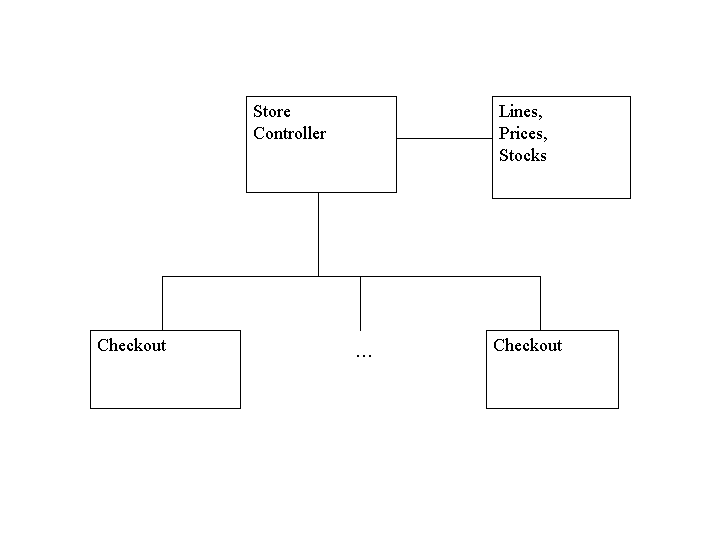
A store controller in a supermarket is to be programmed to support the store's operations. The store has a number of checkouts for registering customers' purchases, and a database of lines sold, prices, and stock levels. The following diagram illustrates the physical configuration.
The store administrator can add checkouts to the configuration as they open for business each day, and can remove them as they close. A checkout cannot be removed if it is processing a customer's purchases. The warehouse manager can add or remove lines, set prices, and change stock levels or descriptions, though lines can only be removed when all the checkouts are closed. Each line has a unique line number corresponding to the barcode on the product. Each checkout can process the purchases of one customer at a time. The checkout operator starts each customer's bill by pressing a key on the checkout keyboard, and then scans each item in a customer's basket. As each item is scanned, its description and price are displayed on the checkout screen. When all the items have been scanned the checkout operator presses another key to get the bill printed. The bill shows the description and price of each item purchased and the total. The price charged for an item is the price recorded in the database for that line at the time that the bill is prepared. The checkout is then ready to process the next customer.
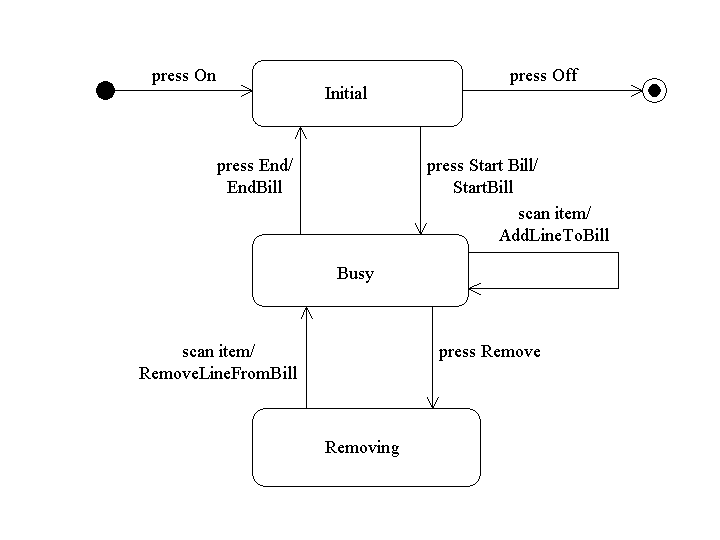
The following statechart explains the operation of the checkout.
Back to the table of contents.
The actors are the store administrator, the warehouse manager, and the checkouts.
The use cases are as follows. (They should be developed from the task analysis, and from the operational characteristics of the checkout.)

The following table provides more informal information about the use cases. In this table the columns are as follows:
| Use case | Intention | Inputs |
|---|---|---|
| AddCheckout | Allows the administrator to add a checkout to the configuration. | checkout_number |
| RemoveCheckout | Allows the administrator to close a checkout when it has no more customers. | checkout_number |
| StartBill | Allows the checkout operator to start a bill for a new customer. | checkout_number |
| AddLineToBill | Allows the checkout operator to add a scanned item to the bill. | checkout_number line_number |
| RemoveLineFromBill | Allows the checkout operator to remove an item from the bill. | checkout_number line_number |
| EndBill | Allows the checkout operator to get a printout of the customer's bill after all the items have been scanned. | checkout_number |
| AddLine | Allows the warehouse manager to add a line to those sold in the store. | line_number line_description line_price line_stock |
| RemoveLine | Allows the warehouse manager to remove a line from those sold in the store. | line_number |
| SetLinePrice | Allows the warehouse manager to change the price of a line. | line_number new_price |
| ChangeLineStock | Allows the warehouse manager to increase or decrease the amount of stock of a line. | line_number stock_change |
Back to the table of contents.
The following UML class diagram captures the structure of the data, and attempts to make some parts of the user vocabulary more precise. It acts as an abstract data model for the system to be developed.
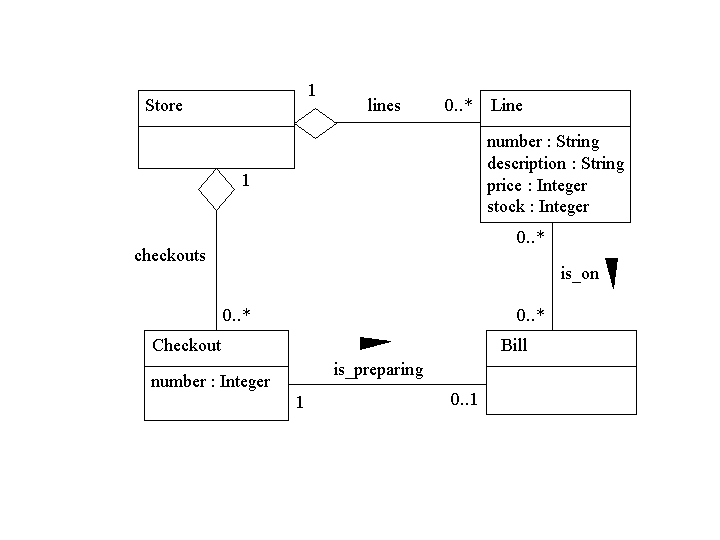
(A1) The Store is an aggregation of Checkout and Line objects. The aggregation relationships are called checkouts, and lines.
(A2) Each Checkout object has a number.
(A3) Each Checkout object is in the checkouts relationship.
(A4) No two Checkout objects have the same number.
(A5) Each Line object has a number, a description, a price, and a stock level.
(A6) Each Line object is in the lines relationship.
(A7) No two Line objects have the same number.
(A8) Each checkout has at most one Bill object associated with it, each Bill object is associated with exactly one Checkout object, and this relationship is called the is_preparing relationship.
(A9) Each bill object is associated with zero or more Line objects, each Line object can be associated with zero or more Bill objects, and this relationship is called the is_on relationship. In this relationship a given Line object can be associated with a given Bill object more than once.
The initial state of the Store has no Checkout objects, and no Line objects, and this state satisfies the constraints.
Back to the table of contents.
The use cases are now reviewed with the class diagram in mind. A more precise statement is given of the function of each use case.
The function of each use case is described in a table with the following columns:
| Inputs | Situation | Change of state | Outputs |
|---|---|---|---|
| checkout_number | checkout_number is the same as the number of a Checkout object. | None | Message: Checkout number already in use. |
| checkout_number is not the same as the number of any Checkout object. | A new Checkout object is created with no associated Bill object. The number of the new Checkout object is checkout_number. The new Checkout object is added to the checkouts relationship. | Message: Checkout added. |
The following diagram illustrates the state change when a checkout is added.

Back to the list of use cases, or to the table of contents.
| Inputs | Situation | Change of state | Outputs |
|---|---|---|---|
| checkout_number | There is a Checkout object whose number is checkout_number, and the checkout object has no associated Bill object. | The Checkout object is removed from the checkouts relationship. | Message: Checkout removed. |
| There is a Checkout object whose number is checkout_number, but the Checkout object is in the is_preparing relationship with a Bill object. | None. | Message: Checkout busy. | |
| There is no Checkout object whose number is checkout_number. | None. | Message: Checkout not found. |
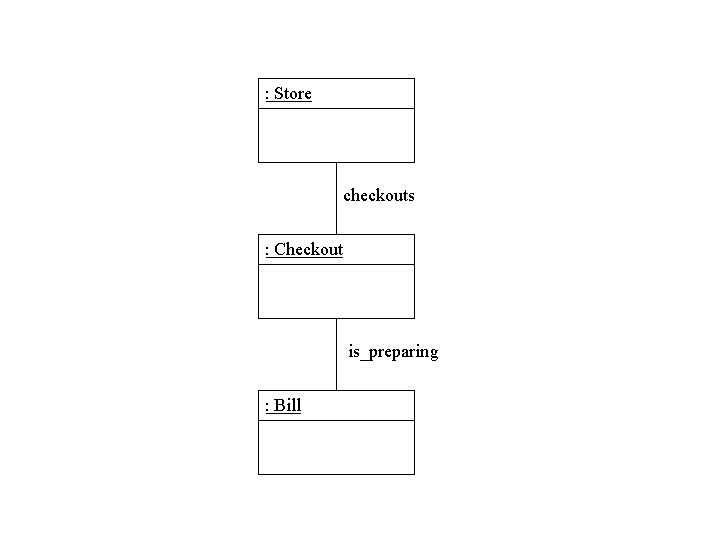
The following diagram illustrates the state when a checkout cannot be removed.
Back to the list of use cases, or to the table of contents.
| Inputs | Situation | Change of state | Outputs |
|---|---|---|---|
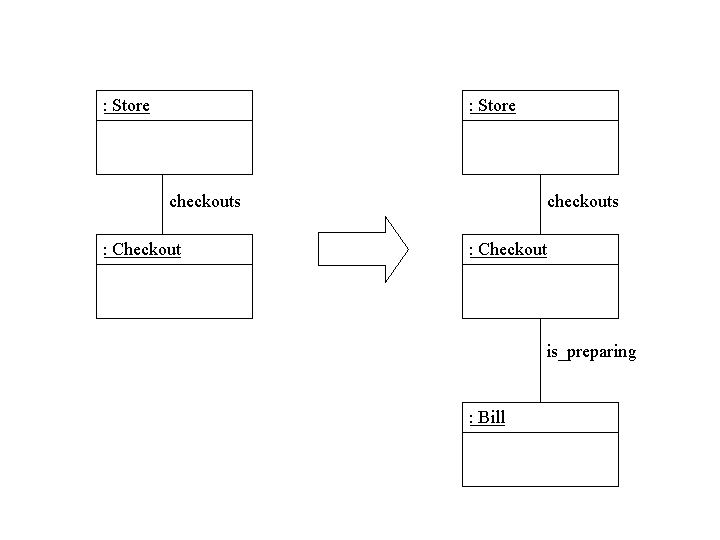
| checkout_number | There is a Checkout object whose number is checkout_number, and this Checkout object has no associated Bill object. | A new Bill object with no associated Line objects is created and associated with the Checkout object. | Message: Bill started. |
The following diagram illustrates the state change when a bill is started at a checkout.
Back to the list of use cases, or to the table of contents.
| Inputs | Situation | Change of state | Outputs |
|---|---|---|---|
| checkout_number line_number |
There is a Checkout object whose number is checkout_number. The Checkout object is in the is_preparing relationship with a Bill object. There is a Line object whose number is line_number. | A new link in the is_on relationship is formed between the Bill object and the Line object. | The description and price of the Line object are displayed on the checkout screen. |
| There is a Checkout object whose number is checkout_number. The Checkout object is in the is_preparing relationship with a Bill object. There is no Line object whose number is line_number. | None | Message: Line not found. |
The following diagram illustrates the state change when a line is added to a bill.

Back to the list of use cases, or to the table of contents.
| Inputs | Situation | Change of state | Outputs |
|---|---|---|---|
| checkout_number line_number |
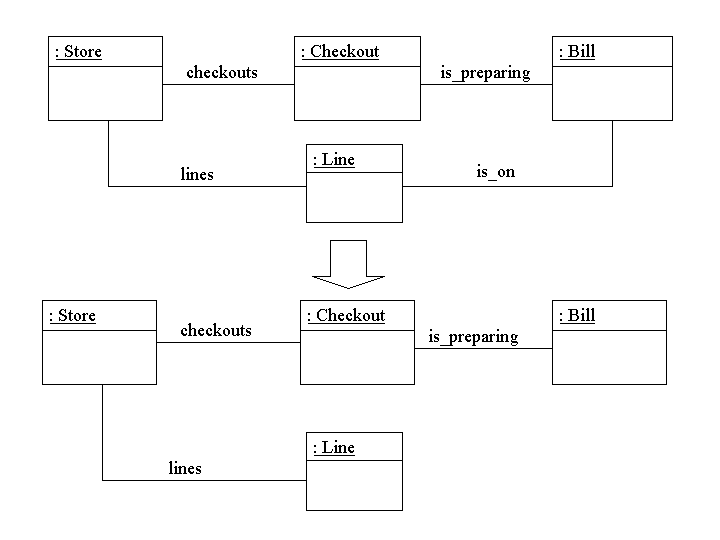
checkout_number is the number of a Checkout object that is associated with a Bill object in the is_preparing relationship. There is a link in the is_on relationship between the Bill object and a Line object whose number is line_number. | The detected link is removed. | Message: Line removed. |
| checkout_number is the number of a Checkout object that is associated with a Bill object in the is_preparing relationship. There is no link in the is_on relationship between the Bill object and a Line object whose number is line_number. | None. | Message: Line not found. |
The following diagram illustrates the state change when a line is removed from a bill.
Back to the list of use cases, or to the table of contents.
| Inputs | Situation | Change of state | Outputs |
|---|---|---|---|
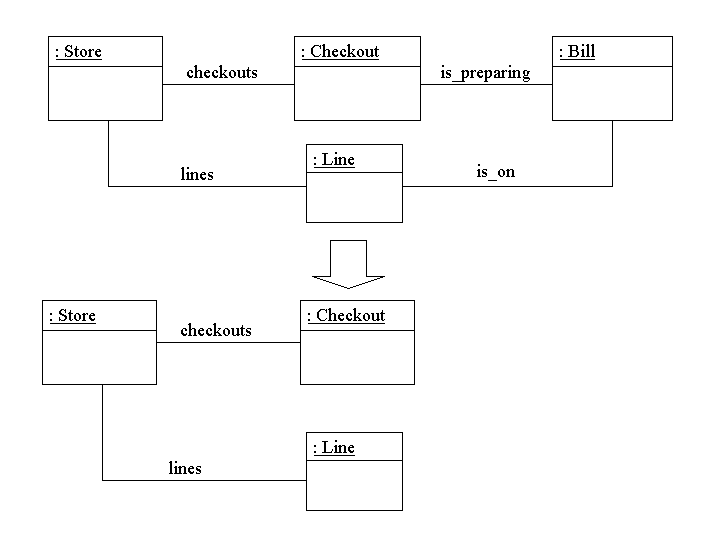
| checkout_number | checkout_number is the number of a Checkout object that is associated with a Bill object. The Bill object is associated with one or more Line objects. | The Bill object and its links to the Checkout object and to Line objects are removed. | List of descriptions and prices of the Line objects associated with the Bill object. Sum of all the prices. |
| checkout_number is the number of a Checkout object that is associated with a Bill object. The Bill object is not associated with any Line objects. | None. | Message: Nothing to list. |
The following diagram illustrates the state change when a bill for which there are lines is ended.
Back to the list of use cases, or to the table of contents.
| Inputs | Situation | Change of state | Outputs |
|---|---|---|---|
| line_number line_description line_price line_stock |
line_number is not the number of any Line object. | A new Line object is created whose number is line_number, description is line_description, stock is line_stock, and price is line_price. The new Line object is added to the lines relationship, but is not associated with any other objects. | Message: Line added. |
| line_number is the number of a Line object. | None. | Message: Line number already in use. |
The following diagram illustrates the state change when a line is added.

Back to the list of use cases, or to the table of contents.
| Inputs | Situation | Change of state | Outputs |
|---|---|---|---|
| line_number | line_number is not the number of a Line object. | None. | Message: Line not found. |
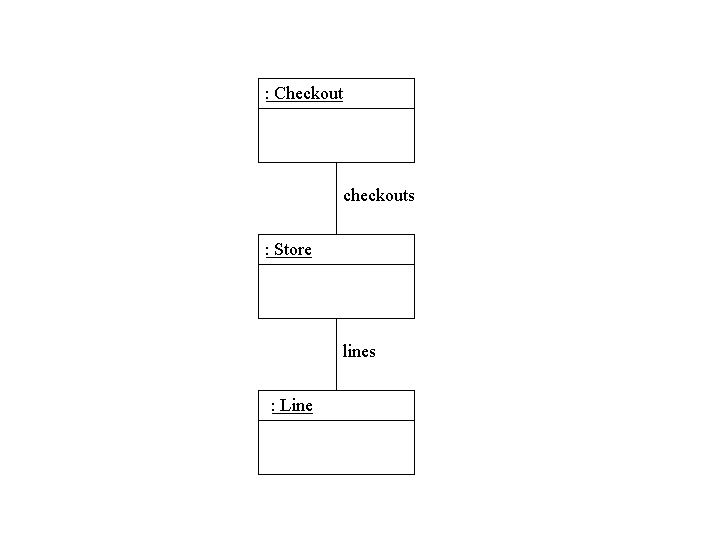
| line_number is the number of a line object. There are Checkout objects in the checkouts relationship. | None. | Message: Checkouts present. | |
| line_number is the number of a line object. There are no Checkout objects in the checkouts relationship. | The Line object is removed from the lines relationship. | Message: Line removed. |
The following diagram illustrates the state when a line cannot be removed.
Back to the list of use cases, or to the table of contents.
| Inputs | Situation | Change of state | Outputs |
|---|---|---|---|
| line_number new_price |
line_number is not the number of any Line object. | None. | Message: Line not found. |
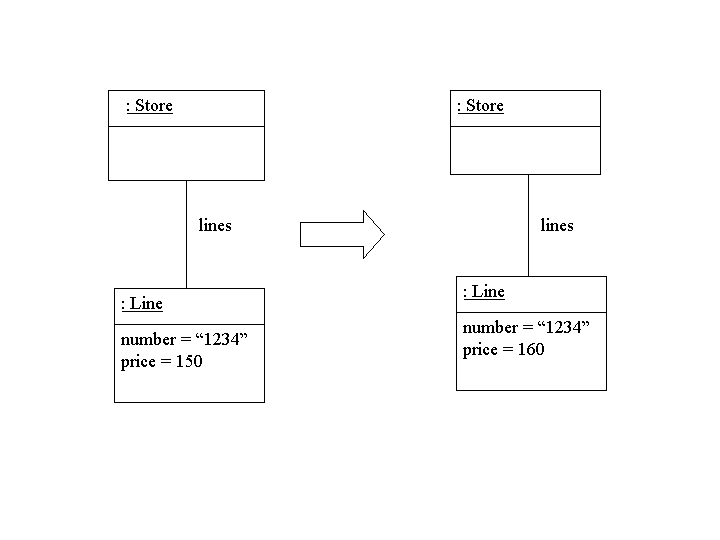
| line_number is the number of a Line object. | The price attribute is changed to new_price. | Message: Price changed. |
The following diagram illustrates the state change when the price of a line is changed.
Back to the list of use cases, or to the table of contents.
| Inputs | Situation | Change of state | Outputs |
|---|---|---|---|
| line_number stock_change |
line_number is not the number of a Line object. | None. | Message: Line not found. |
| line_number is the number of a Line object. | The stock in the Line object is adjusted by stock_change. | Message: Stock level changed. |
The following diagram illustrates the state change when the stock of a line is changed.

Back to the list of use cases, or to the table of contents.
First issued.
Reissued with the following amendments:
Back to the table of contents.